Marcus Biel.

Custom web application development

Web applications for customers, staff and business partners

Give customers a place to report a problem, staff a queue they can work through, and partners access to the documents they need. I build the browser application and connect it to the systems behind those tasks.

Each person sees the records they need and the actions their role allows.

I’m Marcus Biel. I lead the technical work and help build the application.

What do people need to do in your application?

Customers and partners need self-service

A customer portal can give people access to orders, service requests, documents and progress updates.

Customers can track their own requests while staff see what needs a response or a decision.

I’ll help you decide which records to pull from your existing systems and what customers can update themselves.

More about developing customer portals

Staff need a shared workspace

Staff may need to review applications, process orders, add missing documents, or sign off on a request.

I build the necessary views and workflow, including forms, lists, search, progress tracking and actions tailored to each role.

Example of internal order management

People need to see what’s happening and what to do next

A dashboard can bring information from several systems onto one screen and show each team the records that matter to them.

I ask your team what information each user needs and what they should be able to do with it, such as opening a record, checking a discrepancy or taking ownership of a task.

How approvals and exceptions work

One leaking faucet, one service request

A customer reports that water has been dripping under the kitchen sink since yesterday. The portal creates case SV-2417. The customer and the service team now have different views of the same record.

The team sees two open cases. SV-2416 is about a missing invoice and is already being handled. SV-2417 is the new leak report. A team member picks it up and asks the customer for a photo.

Follow SV-2417 through the four screens.

What happens to service request SV-2417
StepWhat the customer and the service team see
1. Report the leakThe customer describes the fault. Staff see a new, unassigned case with its own number and the original description.
2. Ask for a photoA member of the service team takes the case and asks for a photo of the damage. A new message on the customer’s request shows that a reply is due.
3. Attach the photoThe customer uploads a 2.4 MB photo to SV-2417. It appears beside the original description, and the team sees “Reply received.”
4. Update the statusThe team reviews the photo and changes the status to “In progress.” The same update appears in the team’s queue and on the customer’s case.

The form, the case owner, the attachment and the status all refer to SV-2417. That shared record makes it possible to answer a question without asking the customer to explain the problem again.

I design the connections between those screens so both sides can follow the same case.

Discuss your portal or application

Plan the interface, data and permissions together

The right view for each task

I ask users what they need to know at each step and which actions they can take.

That determines the lists, detail views, forms and feedback they need. I also design for empty screens, missing input and work still in progress.

See my UI/UX design and frontend work on Maildroppa

Define roles and access

Customers, staff and administrators need different information and actions.

You define who may see or change each record. I build those rules into the application. The application enforces those permissions when it reads or updates the underlying records.

Include existing systems

If your ERP, CRM or another business application already holds the information, I look at how to connect it.

I identify which system owns each record, how updates reach the other systems, and what the web application needs to store.

More about APIs and system integration

How I built and run Maildroppa

I built and run Maildroppa, an email marketing platform for small businesses.

A customer can create a signup form, write a newsletter, and see who received it. The editors and reports all work with the same subscriber data.

As founder, I work on those screens as well as the services behind them.

The case study shows how the features fit together and what it takes to keep the product running.

Explore the Maildroppa case study
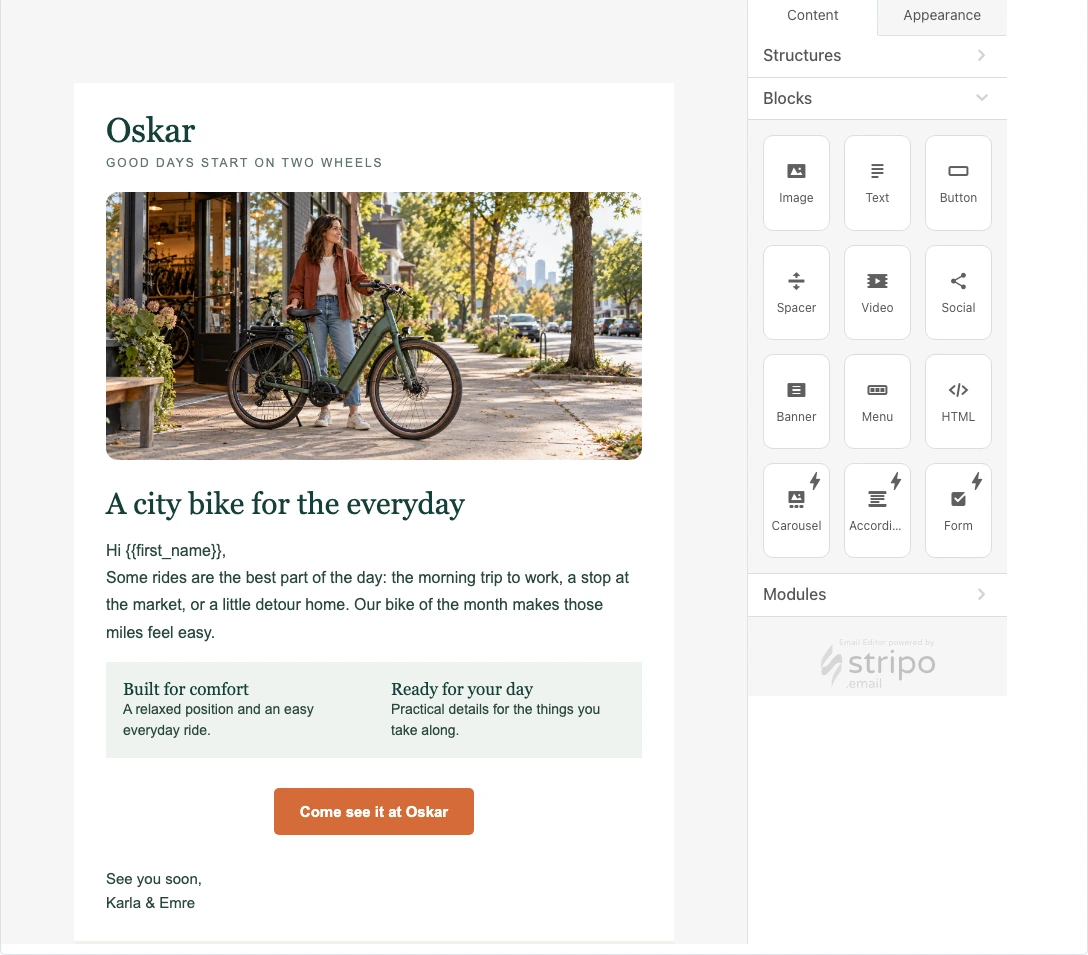
Maildroppa / Campaign editor Oskar Bikes’ sample newsletter in the campaign editor, with blocks for adding images, text, and buttons.
Customers build a newsletter with images, text, and buttons in the campaign editor.

How your web application takes shape

  1. 1. Identify the users and their main task

    First, tell me who will use the application and what they need to do.

    I look at the information people need, the systems that hold it, and where they’ll use the application. A customer on a phone has different needs from a caseworker at a desk.

    Together we choose one workflow to build from start to finish.

  2. 2. Agree on screens and interactions

    I map out the screens for the main task and how someone moves between them.

    You can walk through the designs to see whether the forms ask for the right details and the next action is easy to find.

    The agreed design guides implementation.

  3. 3. Build the first usable version

    I build the screens and the services behind them. Those services store data, enforce permissions, and pass changes on to the right systems.

    You can try the application as it takes shape. We’ll review your feedback and decide how it affects the work ahead.

  4. 4. Prepare for rollout and ongoing development

    For rollout we agree how to deploy, provide access and bring across existing data.

    I review feedback with your team to see what would make the application easier to use. Additional features and workflows can follow in later phases.

Who designs and builds your application?

I’m Marcus Biel. I’ll design the application with you and work on the code.

I can work with your developers or bring in people who specialize in design, development, or running web applications.

I work remotely with teams across Germany. Before we start, we’ll agree on the scope and who owns each part of the work.

More about working with me
Marcus Biel
Marcus BielSoftware developer and architect

Frequently asked questions about web applications

Do we need designs before we contact you?

To get started, tell me who will use the application and what they need to do.

We’ll work through the screens and workflows together. Existing designs, sketches or examples are a helpful starting point.

Can the application be used on smartphones and tablets?

Yes. I design for the devices your customers and staff actually use.

I consider the task as well as the device. A customer submitting a request on a phone may need a different view from a staff member reviewing cases at a desk.

I build and test those workflows at the screen sizes and in the browsers your users rely on.

Can we continue to use our existing data and systems?

I check what information is already available and how the application can access it.

I identify what to migrate, what to retrieve through integrations and what the new application needs to maintain itself.

What does it cost to develop a web application?

Cost depends on how many workflows and screens you need, who can use them, and which systems they connect to.

Existing data, document processing and deployment requirements also affect the work.

With the first release defined, I can quote for it or work within an agreed budget for the first phase.

Can we offer the web application as our own software product?

Yes. I can build the features you’ll need to offer the application to your own customers.

These might include separate customer accounts, team management, subscriptions, and billing.

More about SaaS and MVP development

What should people be able to do in your web app?

Tell me who will use it and walk me through one task they need to finish.

I’ll use that example to identify the screens, data, and integrations for a useful first release.

Other project inquiries: Customer self-service portal · Custom business application.

Prefer to talk first? Call +49 171 1151013 or message me on LinkedIn.

Discuss a web application